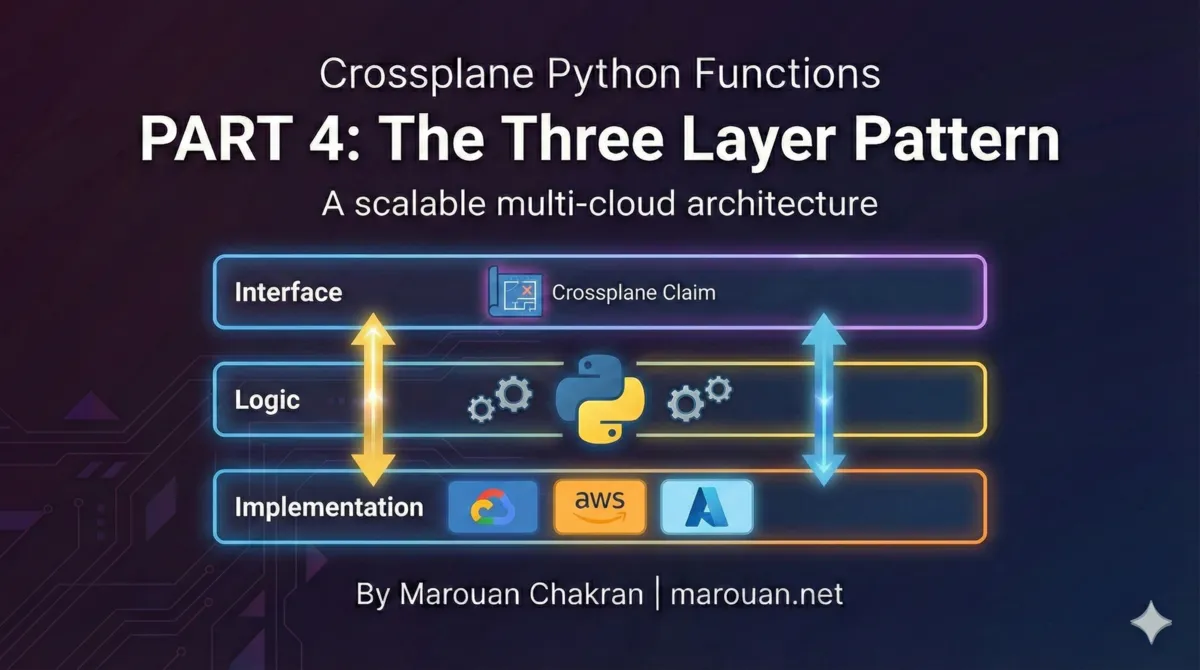
The 3-Layer Resource Pattern
Crossplane Python Functions | Part 4
Building a production multi-cloud platform with Python
In Parts 2 and 3, we built a simple function that creates S3 buckets. But what if users need GCP Cloud Storage or Azure Blob Storage? Do we write separate functions for each cloud?
The answer is no. This post introduces the 3-layer resource pattern—an architecture that lets you write one function call that produces the correct resources for any cloud provider.
The Problem: Cloud-Specific Logic Pollutes Everything
Here's how you might naively handle multi-cloud:
def create_bucket(c: Composition, bucket_name: str, region: str):
    if c.cloud == "gcp":
        bucket = {
            "apiVersion": "storage.gcp.upbound.io/v1beta2",
            "kind": "Bucket",
            "spec": {
                "forProvider": {
                    "location": region,
                    "forceDestroy": True,
                }
            }
        }
    elif c.cloud == "aws":
        bucket = {
            "apiVersion": "s3.aws.upbound.io/v1beta1",
            "kind": "Bucket",
            "spec": {
                "forProvider": {
                    "region": region,
                }
            }
        }
    elif c.cloud == "azure":
        bucket = {
            "apiVersion": "storage.azure.upbound.io/v1beta1",
            "kind": "StorageAccount",
            "spec": {
                "forProvider": {
                    "location": region,
                    "accountTier": "Standard",
                    "accountReplicationType": "LRS",
                }
            }
        }
    add_to_composition(c, bucket)
This approach has problems:
- Every resource function has cloud conditionals - Your codebase becomes a maze of
if/elif/else - Adding a cloud means editing every file - Want to add Oracle Cloud? Touch every resource function
- Testing is complicated - Each function tests 3+ code paths
- Domain logic mixed with cloud details - Hard to see what your platform actually does
The Solution: Separate Concerns into Layers
The 3-layer pattern separates what you want from how each cloud implements it.
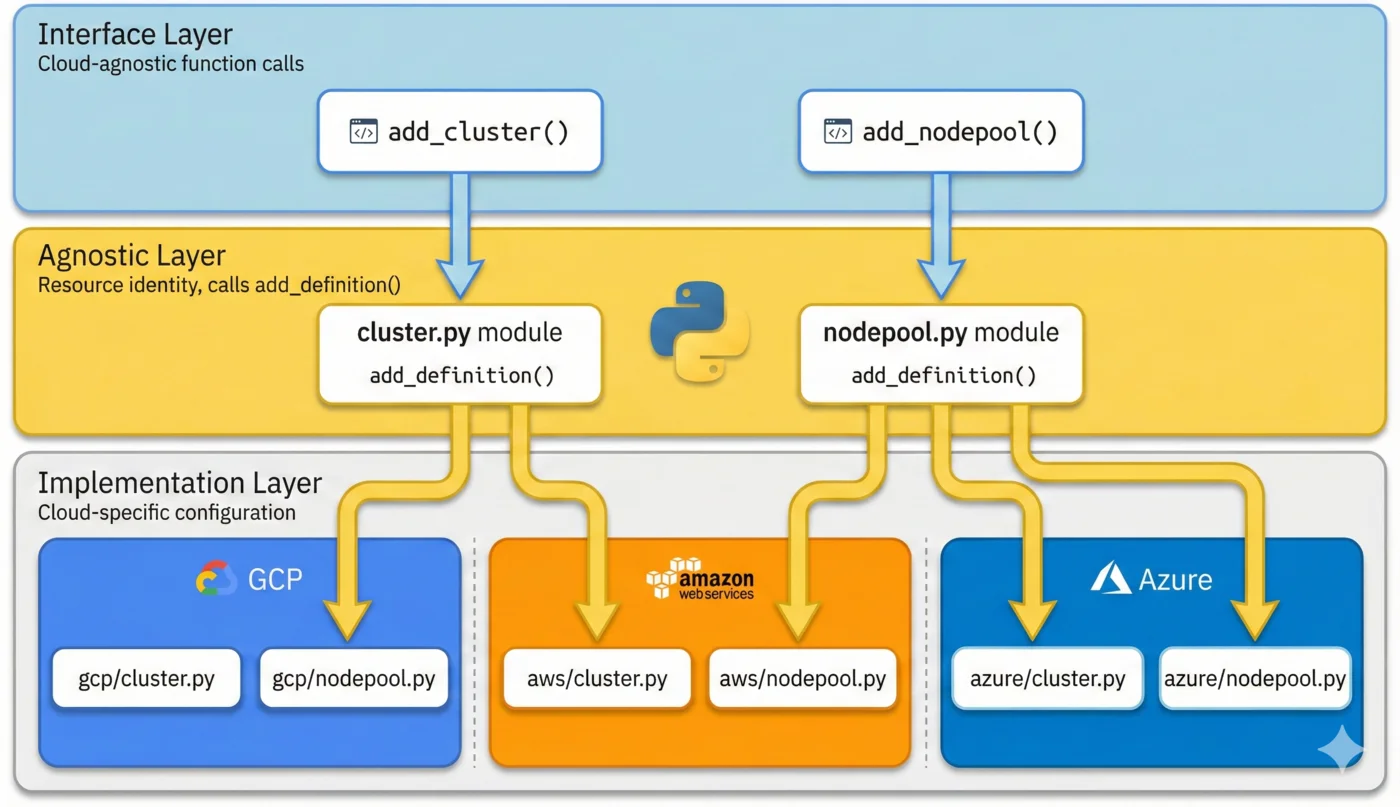
Layer 1: Function Call (Composition Entrypoint)
The composition entrypoint describes what resources to create:
# function/cluster/cluster.py

def deploy_cluster(c: ClusterComposition):
    """Deploy a complete cluster with storage."""

    # Create the storage bucket
    myplatform.add_bucket(
        composition=c,
        name="cluster-state",
        external_name=f"{c.cluster_name}-state",
        template={"spec": {"forProvider": {...}}},
    )

    # Create the cluster
    myplatform.add_cluster(
        composition=c,
        name="cluster",
        external_name=c.cluster_name,
        template={"spec": {"forProvider": c.for_provider}},
    )
Notice: No cloud-specific code. Just declarations of what should exist.
Layer 2: Agnostic Definition
The agnostic layer defines the resource's identity and calls add_definition():
# myplatform/resources/bucket.py

from typing import Unpack
from myplatform.core import ResourceDict, add_definition

def add_bucket(force_destroy: bool, **r: Unpack[ResourceDict]):
    """Add a storage bucket to the composition."""
    definition = {"kind": "Bucket"}
    add_definition(definition, force_destroy, **r)
This layer:
- Defines the kind of resource
- Accepts cloud-agnostic parameters (like
force_destroy) - Delegates to
add_definition()for the magic
Layer 3: Cloud-Specific Implementation
Each cloud has its own implementation file:
# myplatform/resources/gcp/bucket.py

from myplatform.core import Resource

api_version = "storage.gcp.upbound.io/v1beta2"

def add_bucket(force_destroy: bool, r: Resource):
    """GCP Cloud Storage bucket."""
    labels = {
        item["key"]: item["value"]
        for item in r.composition.params.get("finopsLabels", [])
    }

    return {
        "apiVersion": api_version,
        "spec": {
            "forProvider": {
                "location": r.composition.location,
                "forceDestroy": force_destroy,
                "labels": labels,
            }
        },
    }
# myplatform/resources/aws/bucket.py

from myplatform.core import Resource

api_version = "s3.aws.upbound.io/v1beta1"

def add_bucket(force_destroy: bool, r: Resource):
    """AWS S3 bucket."""
    tags = {
        item["key"]: item["value"]
        for item in r.composition.params.get("finopsLabels", [])
    }

    return {
        "apiVersion": api_version,
        "spec": {
            "forProvider": {
                "region": r.composition.location,
                "forceDestroy": force_destroy,
                "tags": tags,
            }
        },
    }
# myplatform/resources/azure/bucket.py

from myplatform.core import Resource

api_version = "storage.azure.upbound.io/v1beta1"

def add_bucket(force_destroy: bool, r: Resource):
    """Azure Storage Account (Azure's equivalent of a bucket)."""
    return {
        "apiVersion": api_version,
        "kind": "StorageAccount",  # Azure uses different kind
        "spec": {
            "forProvider": {
                "location": r.composition.location,
                "accountTier": "Standard",
                "accountReplicationType": "LRS",
            }
        },
    }
Each cloud implementation:
- Returns cloud-specific apiVersion and spec
- Uses cloud-specific field names (location vs region, labels vs tags)
- Can return a different kind if needed (Azure's StorageAccount)
The Magic: add_definition()
The add_definition() function in myplatform/core.py ties everything together:
def add_definition(definition: dict | str, *args, **r: Unpack[ResourceDict]):
    """Add a managed resource definition to the composition.

    This function combines the provided cloud-agnostic definition with
    the definition from the corresponding cloud provider function.
    """
    r = Resource(**r)

    # Accept dict or YAML string
    if isinstance(definition, str):
        definition = yaml.safe_load(definition)

    # Use Python introspection to find the calling function
    stack = inspect.stack()
    parentframe = stack[1][0]
    package, module = inspect.getmodule(parentframe).__name__.rsplit(".", 1)
    name = parentframe.f_code.co_name  # e.g., "add_bucket"

    cloud = r.cloud  # e.g., "gcp"

    # Dynamically load the cloud-specific module
    try:
        # Import myplatform.resources.gcp.bucket
        provider = importlib.import_module(f"{package}.{cloud}.{module}")

        # Call add_bucket from that module
        provider_func = getattr(provider, name)
        definition = always_merger.merge(definition, provider_func(*args, r))

        # Call add_bucket_extra if it exists
        if extra_func := getattr(provider, f"{name}_extra", None):
            extra_func(*args, r)

    except ModuleNotFoundError:
        pass  # Cloud doesn't have a specific implementation

    add_composed(r, definition)
    set_usage(r, definition)
What This Does
- Inspects the call stack to find which function called it (
add_bucket) - Extracts the module name (
bucket) from the caller's location - Dynamically imports
{package}.{cloud}.{module}(e.g.,myplatform.resources.gcp.bucket) - Calls the matching function (
add_bucket) in the cloud module - Deep merges the agnostic and cloud-specific definitions
- Calls
_extra()if it exists for post-processing - Adds the resource to the composition output
The _extra() Pattern for Post-Processing
Some clouds need additional resources beyond the main one. AWS EKS, for example, requires a separate ClusterAuth resource to export kubeconfig.
The _extra() pattern handles this:
# myplatform/resources/aws/cluster.py

def add_cluster(r: Resource):
    """AWS EKS cluster definition."""
    return {
        "apiVersion": "eks.aws.upbound.io/v1beta1",
    }

def add_cluster_extra(r: Resource):
    """Add EKS-specific resources after the cluster."""
    # AWS needs a ClusterAuth for kubeconfig
    add_cluster_auth(r)
    # Add usage relationship
    add_clusterauth_usage(r)

def add_cluster_auth(r: Resource):
    """ClusterAuth exports the kubeconfig."""
    aws_cluster_auth = {
        "apiVersion": "eks.aws.upbound.io/v1beta1",
        "kind": "ClusterAuth",
        "spec": {
            "forProvider": {
                "region": r.template["spec"]["forProvider"]["region"],
                "clusterName": r.external_name,
            },
            "writeConnectionSecretToRef": {
                "namespace": r.composition.ns,
                "name": r.external_name,
            },
        },
    }
    update_response(r.composition, "cluster_auth", aws_cluster_auth)

def add_clusterauth_usage(r: Resource):
    """Prevent ClusterAuth from being deleted before Cluster."""
    add_usage(r.composition, of="cluster_auth", by=r.name)
GCP doesn't need this, so myplatform/resources/gcp/cluster.py has no add_cluster_extra().
When to Use _extra()
- Related resources: AWS ClusterAuth, Azure Resource Groups
- Cloud-specific API enablement: GCP needs APIs enabled per project
- Conditional resources: Add read replica only on certain clouds
- Usage relationships: Different dependency chains per cloud
Deep Merging Strategy
The always_merger.merge() from the deepmerge library combines dictionaries:
# Agnostic definition
{"kind": "Bucket"}

# Cloud-specific definition
{
    "apiVersion": "storage.gcp.upbound.io/v1beta2",
    "spec": {"forProvider": {"location": "US"}}
}

# Merged result
{
    "kind": "Bucket",
    "apiVersion": "storage.gcp.upbound.io/v1beta2",
    "spec": {"forProvider": {"location": "US"}}
}
Cloud-specific values override agnostic ones at each key level, but nested structures are merged recursively.
File Organization
Here's the directory structure:
myplatform/
├── resources/
│   ├── bucket.py           # Agnostic: add_bucket()
│   ├── cluster.py          # Agnostic: add_cluster()
│   ├── nodepool.py         # Agnostic: add_nodepool()
│   ├── gcp/
│   │   ├── bucket.py       # GCP: add_bucket(r)
│   │   ├── cluster.py      # GCP: add_cluster(r)
│   │   └── nodepool.py     # GCP: add_nodepool(r)
│   ├── aws/
│   │   ├── bucket.py       # AWS: add_bucket(r)
│   │   ├── cluster.py      # AWS: add_cluster(r), add_cluster_extra(r)
│   │   └── nodepool.py     # AWS: add_nodepool(r)
│   └── azure/
│       ├── bucket.py       # Azure: add_bucket(r)
│       ├── cluster.py      # Azure: add_cluster(r)
│       └── nodepool.py     # Azure: add_nodepool(r)
└── core.py                 # add_definition() implementation
Adding a New Resource Type
-
Create
myplatform/resources/newresource.py:def add_newresource(**r: Unpack[ResourceDict]): add_definition({"kind": "NewResource"}, **r) -
Create cloud implementations:
# myplatform/resources/gcp/newresource.py def add_newresource(r: Resource): return {"apiVersion": "...", "spec": {...}} -
Export in
myplatform/__init__.py:from .resources.newresource import add_newresource
Adding a New Cloud Provider
-
Create the directory:
myplatform/resources/oracle/ -
Implement each resource:
# myplatform/resources/oracle/bucket.py
def add_bucket(force_destroy: bool, r: Resource):
    return {
        "apiVersion": "objectstorage.oci.upbound.io/v1beta1",
        "spec": {...}
    }
No changes to agnostic layer or other clouds needed.
The Resource Class
Cloud implementations receive a Resource object with everything they need:
@dataclass
class Resource:
    composition: Composition  # Full composition state
    cloud: str               # "gcp", "aws", "azure"
    name: str                # Composition resource name
    external_name: str       # Cloud resource name
    template: dict           # User-provided overrides
    uses: list               # Dependencies
    is_k8s_object: bool      # Wrap as Kubernetes Object?
Access composition data:
def add_cluster(r: Resource):
    location = r.composition.location
    params = r.composition.params
    labels = r.composition.labels
    env = r.composition.env
Complete Example: Multi-Cloud Cluster
Here's how the full flow works:
1. User Creates Claim
apiVersion: myplatform.io/v1alpha1
kind: Cluster
metadata:
  name: prod-cluster
  labels:
    cloud: gcp  # Or aws, azure
spec:
  parameters:
    domain: prod.example.com
  forProvider:
    location: us-central1
2. Composition Entrypoint
# function/cluster/cluster.py

def deploy_cluster(c: ClusterComposition):
    # This single call produces the right resource for any cloud
    myplatform.add_cluster(
        composition=c,
        name="cluster",
        external_name=c.cluster_name,
        template={"spec": {"forProvider": c.for_provider}},
    )

    for pool_name, pool_config in c.pools.items():
        myplatform.add_nodepool(
            composition=c,
            name=f"pool-{pool_name}",
            template={"spec": {"forProvider": pool_config}},
            uses=["cluster"],
        )
3. Result for GCP
apiVersion: container.gcp.upbound.io/v1beta2
kind: Cluster
metadata:
  name: prod-cluster-xxxxx
  annotations:
    crossplane.io/external-name: prod-cluster
spec:
  forProvider:
    location: us-central1
    # GCP-specific config...
4. Result for AWS
apiVersion: eks.aws.upbound.io/v1beta1
kind: Cluster
metadata:
  name: prod-cluster-xxxxx
spec:
  forProvider:
    region: us-central1
    # AWS-specific config...
---

# AWS also gets ClusterAuth from _extra()
apiVersion: eks.aws.upbound.io/v1beta1
kind: ClusterAuth
metadata:
  name: prod-cluster-xxxxx-auth
spec:
  forProvider:
    region: us-central1
    clusterName: prod-cluster
Benefits of This Pattern
- Single function calls -
add_cluster()works for all clouds - Isolated cloud logic - GCP code in
gcp/, AWS inaws/ - Easy to extend - New clouds don't touch existing code
- Testable - Test agnostic layer separately from cloud implementations
- Readable entrypoints - Business logic is clear, not buried in conditionals
Key Takeaways
- Layer 1 (entrypoint): Describes what to create, cloud-agnostic
- Layer 2 (agnostic): Defines identity, calls
add_definition() - Layer 3 (cloud-specific): Returns cloud-specific configuration
add_definition()uses Python introspection to find and merge implementations_extra()pattern handles cloud-specific post-processing- Deep merge combines agnostic and cloud definitions
Next Up
In Part 5, we'll dive deeper into the Python introspection magic behind add_definition(). You'll understand exactly how inspect and importlib work together to make this pattern possible—and learn when to extend it.
Written by Marouan Chakran, Senior SRE and Platform Engineer, building multi-cloud platforms with Crossplane and Python.
Part 4 of 10 | Previous: Understanding Function I/O | Next: Dynamic Provider Discovery
Companion repository: github.com/Marouan-chak/crossplane-python-blog-series
Tags: crossplane, platform-engineering, kubernetes, python, devops