
Your First Python Composition Function
Crossplane Python Functions | Part 2
Building a production multi-cloud platform with Python
In Part 1, we discussed why Python is an excellent choice for Crossplane composition functions. Now it's time to build one.
By the end of this post, you'll have a working Python composition function that creates cloud storage buckets. You'll know how to scaffold, test locally, and deploy to a cluster.
Prerequisites
Before we begin, ensure you have:
Required Tools
# Python 3.11 or later
python3 --version  # Should be 3.11+

# Hatch - Python project manager
pip install hatch

# Docker - for building images
docker --version

# Crossplane CLI - for local testing
curl -sL https://raw.githubusercontent.com/crossplane/crossplane/master/install.sh | sh
sudo mv crossplane /usr/local/bin/
crossplane --version  # Should be 1.14+
Optional: Crossplane Cluster
For deployment (not required for local testing):
# Verify Crossplane is installed
kubectl get pods -n crossplane-system
Scaffolding Your Function
The Crossplane CLI includes a scaffolding command that creates a complete Python function project.
Initialize the Project
# Create a new function project
crossplane xpkg init function-bucket-creator --template function-template-python

# Enter the directory
cd function-bucket-creator
This generates a project structure ready for development.
Generated Structure
Let's examine what the template created:
function-bucket-creator/
├── fn.py                    # Your function logic lives here
├── main.py                  # gRPC server entry point
├── Dockerfile               # Container image definition
├── pyproject.toml           # Python project configuration
├── example/
│   ├── composition.yaml     # Example composition
│   ├── functions.yaml       # Function reference
│   └── xr.yaml              # Example composite resource
└── package/
    └── crossplane.yaml      # Crossplane package metadata
The key files:
fn.py: Where you write your composition logicmain.py: Starts the gRPC server (rarely modified)Dockerfile: Builds the function imageexample/: Test fixtures for local development
Understanding the Function Anatomy
Open fn.py to see the function skeleton:
"""A Crossplane composition function."""

import grpc
from crossplane.function import logging, response
from crossplane.function.proto.v1 import run_function_pb2 as fnv1
from crossplane.function.proto.v1.run_function_pb2_grpc import (
    FunctionRunnerServiceServicer,
)

class FunctionRunner(FunctionRunnerServiceServicer):
    """A Crossplane composition function."""

    def __init__(self):
        """Create a new FunctionRunner."""
        self.log = logging.get_logger()

    def RunFunction(
        self, req: fnv1.RunFunctionRequest, context: grpc.ServicerContext
    ) -> fnv1.RunFunctionResponse:
        """Run the function."""
        log = self.log.bind(tag=req.meta.tag)
        log.info("Running function")

        rsp = response.to(req)

        # Your logic goes here

        return rsp
Key Components
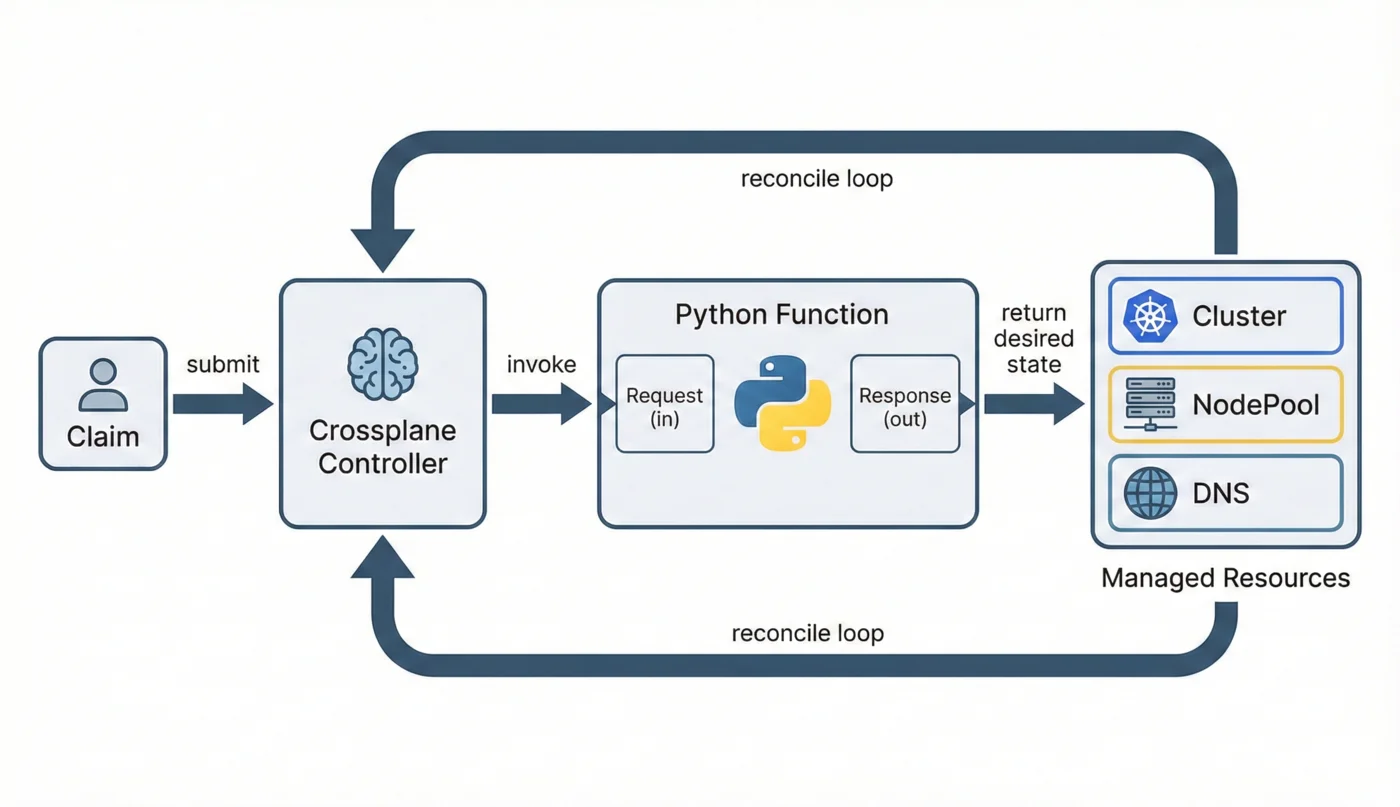
1. FunctionRunnerServiceServicer: The gRPC service interface. Your class implements the RunFunction method.
2. RunFunctionRequest: Contains everything about the current state:
req.observed: Resources that exist in the clusterreq.desired: Resources requested so far in the pipelinereq.input: Configuration passed to your functionreq.context: Environment configs and extra data
3. RunFunctionResponse: What you return:
rsp.desired: Resources you want to existrsp.results: Warnings, errors, or info messagesrsp.context: Data to pass to subsequent functions
4. response.to(req): A helper that initializes a response from a request, copying over the existing desired state.
Writing Your First Function
Let's modify the function to create storage buckets. Replace the content of fn.py:
"""A composition function that creates storage buckets."""

import grpc
from crossplane.function import logging, response
from crossplane.function.proto.v1 import run_function_pb2 as fnv1
from crossplane.function.proto.v1.run_function_pb2_grpc import (
    FunctionRunnerServiceServicer,
)
from google.protobuf import struct_pb2

class FunctionRunner(FunctionRunnerServiceServicer):
    """Creates storage buckets based on composite resource spec."""

    def __init__(self):
        self.log = logging.get_logger()

    def RunFunction(
        self, req: fnv1.RunFunctionRequest, context: grpc.ServicerContext
    ) -> fnv1.RunFunctionResponse:
        log = self.log.bind(tag=req.meta.tag)
        log.info("Running bucket creator function")

        # Initialize response from request
        rsp = response.to(req)

        # Get the composite resource (XR)
        xr = req.observed.composite.resource

        # Extract parameters from the XR spec
        spec = dict(xr.get("spec", {}))
        bucket_name = spec.get("bucketName", "my-bucket")
        region = spec.get("region", "us-east-1")

        # Create the bucket resource
        bucket = {
            "apiVersion": "s3.aws.upbound.io/v1beta1",
            "kind": "Bucket",
            "metadata": {
                "name": f"{bucket_name}-bucket",
                "annotations": {
                    "crossplane.io/external-name": bucket_name,
                },
            },
            "spec": {
                "forProvider": {
                    "region": region,
                },
                "providerConfigRef": {
                    "name": "default",
                },
            },
        }

        # Convert to protobuf Struct
        bucket_struct = struct_pb2.Struct()
        _dict_to_struct(bucket, bucket_struct)

        # Add to desired resources
        rsp.desired.resources["bucket"].resource.CopyFrom(bucket_struct)

        log.info("Added bucket to desired resources", bucket_name=bucket_name)

        return rsp

def _dict_to_struct(d: dict, struct: struct_pb2.Struct) -> None:
    """Convert a Python dict to a protobuf Struct."""
    for key, value in d.items():
        if isinstance(value, dict):
            _dict_to_struct(value, struct.fields[key].struct_value)
        elif isinstance(value, list):
            for item in value:
                if isinstance(item, dict):
                    item_struct = struct.fields[key].list_value.values.add().struct_value
                    _dict_to_struct(item, item_struct)
                else:
                    struct.fields[key].list_value.values.add().string_value = str(item)
        elif isinstance(value, bool):
            struct.fields[key].bool_value = value
        elif isinstance(value, (int, float)):
            struct.fields[key].number_value = value
        elif value is None:
            struct.fields[key].null_value = 0
        else:
            struct.fields[key].string_value = str(value)
What This Does
- Extracts parameters from the composite resource's spec
- Builds a bucket resource with the AWS S3 provider format
- Adds it to desired resources so Crossplane creates it
Testing Locally
The Crossplane CLI can test functions without deploying to a cluster.
Create Test Fixtures
Update example/xr.yaml with a composite resource:
apiVersion: example.crossplane.io/v1alpha1
kind: XBucket
metadata:
  name: test-bucket
spec:
  bucketName: my-test-bucket
  region: us-west-2
Update example/composition.yaml:
apiVersion: apiextensions.crossplane.io/v1
kind: Composition
metadata:
  name: xbuckets.example.crossplane.io
spec:
  compositeTypeRef:
    apiVersion: example.crossplane.io/v1alpha1
    kind: XBucket
  mode: Pipeline
  pipeline:
    - step: create-bucket
      functionRef:
        name: function-bucket-creator
Update example/functions.yaml to point to localhost for development:
apiVersion: pkg.crossplane.io/v1beta1
kind: Function
metadata:
  name: function-bucket-creator
spec:
  package: localhost:9443
Start the Development Server
In one terminal:
# Install dependencies and start the server
hatch run development
You should see:
Serving on [::]:9443
Render the Composition
In another terminal:
crossplane beta render \
  example/xr.yaml \
  example/composition.yaml \
  example/functions.yaml
Output:
---
apiVersion: example.crossplane.io/v1alpha1
kind: XBucket
metadata:
  name: test-bucket
---
apiVersion: s3.aws.upbound.io/v1beta1
kind: Bucket
metadata:
  annotations:
    crossplane.io/composition-resource-name: bucket
    crossplane.io/external-name: my-test-bucket
  generateName: test-bucket-
  labels:
    crossplane.io/composite: test-bucket
  name: my-test-bucket-bucket
  ownerReferences:
    - apiVersion: example.crossplane.io/v1alpha1
      blockOwnerDeletion: true
      controller: true
      kind: XBucket
      name: test-bucket
      uid: ""
spec:
  forProvider:
    region: us-west-2
  providerConfigRef:
    name: default
Your function created a Bucket resource from the composite resource spec.

View Function Logs
Add the -r flag to see function results:
crossplane beta render example/xr.yaml example/composition.yaml example/functions.yaml -r
This shows any warnings, errors, or info messages from your function.
Building the Container Image
For deployment, package your function as a container image.
Build with Docker
# Build the image
docker build -t your-registry/function-bucket-creator:v0.1.0 .

# Test locally
docker run -p 9443:9443 your-registry/function-bucket-creator:v0.1.0
Multi-Platform Builds
For production, build for multiple architectures:
docker buildx create --use
docker buildx build \
  --platform linux/amd64,linux/arm64 \
  -t your-registry/function-bucket-creator:v0.1.0 \
  --push .
Building the Crossplane Package
Crossplane functions are distributed as OCI packages.
Update Package Metadata
Edit package/crossplane.yaml:
apiVersion: meta.pkg.crossplane.io/v1
kind: Function
metadata:
  name: function-bucket-creator
  annotations:
    meta.crossplane.io/maintainer: Your Name <you@example.com>
    meta.crossplane.io/description: Creates storage buckets from composite resources
spec:
  crossplane:
    version: ">=1.14.0"
Build the Package
crossplane xpkg build \
  -f package/ \
  --embed-runtime-image=your-registry/function-bucket-creator:v0.1.0 \
  -o function-bucket-creator.xpkg
Push to Registry
crossplane xpkg push \
  -f function-bucket-creator.xpkg \
  your-registry/function-bucket-creator:v0.1.0
Deploying to a Cluster
Install the Function
cat <<EOF | kubectl apply -f -
apiVersion: pkg.crossplane.io/v1beta1
kind: Function
metadata:
  name: function-bucket-creator
spec:
  package: your-registry/function-bucket-creator:v0.1.0
EOF
Verify Installation
kubectl get functions

# Output:
# NAME                      INSTALLED   HEALTHY   PACKAGE                                           AGE
# function-bucket-creator   True        True      your-registry/function-bucket-creator:v0.1.0   30s
Create a Composition Using Your Function
apiVersion: apiextensions.crossplane.io/v1
kind: Composition
metadata:
  name: xbuckets.example.crossplane.io
spec:
  compositeTypeRef:
    apiVersion: example.crossplane.io/v1alpha1
    kind: XBucket
  mode: Pipeline
  pipeline:
    - step: create-bucket
      functionRef:
        name: function-bucket-creator
Now when users create XBucket claims, your function generates the S3 Bucket resources.
Development Workflow Summary
Here's the workflow you'll use repeatedly:
# 1. Start development server
hatch run development

# 2. Edit fn.py with your changes

# 3. Test with render (changes hot-reload)
crossplane beta render example/xr.yaml example/composition.yaml example/functions.yaml -r

# 4. Iterate until happy

# 5. Build and push for production
docker buildx build --platform linux/amd64,linux/arm64 -t registry/function:tag --push .
crossplane xpkg build -f package/ --embed-runtime-image=registry/function:tag
crossplane xpkg push -f function.xpkg registry/function:tag
Common Issues
Port Already in Use
# Find what's using port 9443
lsof -i :9443

# Kill it
kill <PID>
Function Not Responding
# Check the server is running
ps aux | grep "hatch run"

# Restart
pkill -f development
hatch run development
Protobuf Conversion Errors
The SDK's dict-to-struct conversion can be tricky. For complex nested structures, use the helper function shown above or the SDK's built-in utilities.
Key Takeaways
crossplane xpkg initscaffolds a complete function projecthatch run developmentstarts a hot-reloading development servercrossplane beta rendertests functions locally without a cluster- Functions receive requests with observed/desired state and return responses with updated desired state
- Package as OCI images for production deployment
Next Up
In Part 3, we'll deep-dive into the function I/O structures. You'll learn exactly what's in RunFunctionRequest, how to navigate observed and desired state, and how to build a type-safe Composition class that makes working with these structures much easier.
Written by Marouan Chakran, Senior SRE and Platform Engineer, building multi-cloud platforms with Crossplane and Python.
Part 2 of 10 | Previous: Why Python for Crossplane? | Next: Understanding Function I/O
Companion repository: github.com/Marouan-chak/crossplane-python-blog-series
Tags: crossplane, platform-engineering, kubernetes, python, devops